Book an Appointment
Call Land O' Lakes Computer Repair Service at 813-400-2865
                   

(813) 400-2865

*


Land O' Lakes Computer Repair Service has provided the best mobile computer repair in Land O' Lakes, FL and the greater Tampa Bay Area since 1999. The term "mobile computer repair" means we come to you to resolve all your computer problems.

We repair laptops, desktops, PCs and Apple computers. One of our highly qualified staff will come to you, often the same day, to take care of all your repair needs.

Why not use the #1 rated company for computer repair in Land O' Lakes, FL?

Computer Repair 4.9 / 5 stars from 306 reviews
Why use a computer tech when you can have a Land O' Lakes based Computer Engineer? Mon-Sun 8:00am - 8:00pm

Call us at (813) 400-2865

Text us at (813) 400-2865

Email us your questions

Book an Appointment

"Jason did an awesome job at explaining all the questions that we had! He will be our go to computer guru from now on! We highly recommend him!!"
Land O' Lakes Computer Repair Service 5 / 5 stars
"Ben was very professional, answered questions, offered advise pleasantly. I appreciated his assistance in securing my computer."
Land O' Lakes Computer Repair Service 5 / 5 stars
"Great service - from the initial phone call and scheduling - very upfront on costs - and ease of biz. Showed up on time, with a 15 min courtesy call -- he was professional, knowledgeable and gave great advice. He replaced my hard drive and got me back up and running. I would recommend this service. I chose it b/c of all the positive online reviews - and I was not disappointed. Nice job!"
Land O' Lakes Computer Repair Service 5 / 5 stars
"Great service today! Fixed all of my issues and was very helpful in making suggestions on products to fit my needs. Arrived on time and was pleasant and professional. I will call again!"
Land O' Lakes Computer Repair Service 5 / 5 stars
"Excellent service, same day, actually same hour. 30 minutes and we were back working. A+"
Land O' Lakes Computer Repair Service 5 / 5 stars

Who is Land O' Lakes Computer Repair Service?

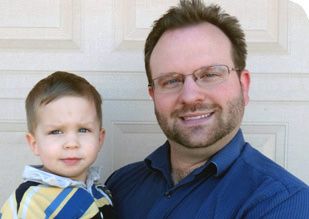
Land O' Lakes Computer Repair Service is owned by Matt Karls, an Electrical Engineer and a Computer Systems Engineer. We are a team of computer professionals focused on Service and quality, all our work is guaranteed.

If you have any computer, technology or IT problem in Land O' Lakes, FL we can fix it. We have been performing computer repair in Land O' Lakes full time since 1999. Feel free to give us a call or text us at (813) 400-2865.

Land O' Lakes Computer Repair Service's Computer Engineer

What is your Service Area for on-site Computer Repair?

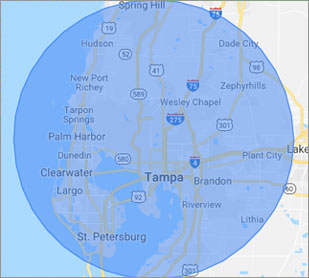
Our primary on-site mobile service areas include the greater Tampa Bay Area and the Phoenix, Tucson, Las Vegas, San Diego, Salt Lake City, Denver, Dallas-Fort Worth and Orlando metro areas.

We provide remote and mobile computer repair in Land O' Lakes, Apollo Beach, Bayonet Point, Brandon, Carrollwood, Cheval, Citrus Park, Clearwater, Dunedin, East Lake, East Lake-Orient Park, Egypt Lake-Leto, Elfers, Gibsonton, Gulfport, Holiday, Hudson, Jasmine Estates, Keystone, Lake Magdalene, Largo, Lutz, Mango, New Port Richey, Northdale, Oldsmar, Palm Harbor, Palm River-Clair Mel, Pinellas Park, Plant City, Riverview, Ruskin, Safety Harbor, Seminole, Shady Hills, Spring Hill, St. Pete Beach, St. Petersburg, Sun City Center, Tampa, Tarpon Springs, Temple Terrace, Thonotosassa, Town 'n' Country, Trinity, University, Valrico, Wesley Chapel, Westchase and Zephyrhills.

Our on-site Computer Service Area

What should someone expect that hires you for Computer Service?

Our mission is to fully resolve your computer problems quickly and affordably. If you want a Computer Engineer that can fix all of your computer problems instead of a computer tech, a computer geek, a technician or a computer guy that can only fix some of your problems; call us at (813) 400-2865.  

What types of Computer Services do you perform?

We service businesses and business clients in their homes, including:
 
  • Diagnose / repair hardware or software problems
  • Spyware, malware, trojan and virus removal
  • Setup wireless and small business networks
  • Laptop repair, PC repair and Apple repair
  • Hard drive data recovery

Land O' Lakes Computer Repair Service Contact Information

Land O' Lakes Computer Repair Service
(813) 400-2865

Land O' Lakes Computer Repair Service is a Karls Technology company

* *
*
*
*
  *
* *


*
*
* * * * * * * * * * * * * * *
4.9 / 5 stars from 306 reviews

"My whole experience was great. Ken was personal as well as professional. He was quick and efficient. I would highly recommend."

Land O' Lakes Computer Repair Service 5 / 5 stars

"Awesome and very fun to talk with!"

Land O' Lakes Computer Repair Service 5 / 5 stars

"Jason was the epitome of professionalism. He was so knowledgeable as well as thorough. I would use him anytime. I am extremely happy and thank you very much."

Land O' Lakes Computer Repair Service 5 / 5 stars

"The service was prompt and professional and the price was right! Thank you very much!"

Ahwatukee Computer Repair Service 5 / 5 stars
Best Antivirus Software of 2026: The Ultimate Guide to Cybersecurity Brands

In 2026, the digital threat landscape has shifted. We are no longer just fighting simple viruses; we are defending against AI-generated phishing, sophisticated ransomware-as-a-service, and complex identity theft. Choosing the right antivirus brand is no longer optional—it is the foundation of your digital life. At Karls Technology, we’ve analyzed the top-performing security suites of the […] The post Best Antivirus Software of 2026: The Ultimate Guide to Cybersecurity Brands appeared first on Computer Repair Blog.

How to Delete Cookies

In your browser settings, you will find the clear browser data. With Google Chrome, click on the three dots on the top right corner of the browser. From there, scroll to More tools and a second list will show up. Click the Clear browser data option. Afterwards, a pop-up occurs, like the one below: You can now clear whatever history, […] The post How to Delete Cookies appeared first on Computer Repair Blog.

If You Don’t Have Newest Windows 11 Update

Your PC may not be compatible with the latest version, or you may not have met the system requirements, thus you haven’t gotten the update notification yet. It’s more probable that you’ll run into issues after upgrading to Windows 11 through Windows Update if you haven’t been warned against doing so. The rollout of the […] The post If You Don’t Have Newest Windows 11 Update appeared first on Computer Repair Blog.

What are Snap Layouts?

Microsoft users, read on! According to Microsoft, snap layouts are a new Windows 11 feature to help introduce users to the power of window snapping. Snap layouts are easily accessible by hovering the mouse over a window’s maximize button or pressing Win + Z. These snap layouts provide you a lot of leeway in terms […] The post What are Snap Layouts? appeared first on Computer Repair Blog.

Guide to Antivirus Brands in 2024

Karls Technology’s Comprehensive Guide to the Best Antivirus Brands in 2024 In today’s digital age, cybersecurity is more critical than ever. With the increasing number of cyber threats, from malware and phishing attacks to ransomware and identity theft, having reliable antivirus software is a necessity. The market is saturated with numerous antivirus brands, each offering […] The post Guide to Antivirus Brands in 2024 appeared first on Computer Repair Blog.

New Feature for AirTags

Apple is currently working on an additional feature on Find My to allow AirTags to “chirp”. This is a small, but important accessory to their product. According to sources from 9to5Mac, AirTag and a few other third-party devices allow you to “ping” an accessory with a sound. With this revision, the same function will be […] The post New Feature for AirTags appeared first on Computer Repair Blog.

Smart App Control on Windows

Microsoft’s newest Windows 11 update (22H2) came with a plethora of new features. One in particular is the Smart App Control, or SAC. What is SAC? According to Microsoft, the capacity of Smart App Control to terminate potentially dangerous or otherwise unreliable applications enables an effective defense against new and unanticipated threats. With the SAC, […] The post Smart App Control on Windows appeared first on Computer Repair Blog.

Multitask Using Task View

Having numerous virtual desktops might be very helpful if you only have access to a single monitor and are trying to do several tasks at once. In Windows 10, you can find this option in the Task View section. The Windows 10’s Task View feature allows you to use numerous programs at once in a […] The post Multitask Using Task View appeared first on Computer Repair Blog.

MacOS Ventura Update is Available

Check Software Update in the System Settings App. macOS Ventura makes the things you do most on Mac even better, with powerful new ways to get more done, share and collaborate in your favorite apps, immerse yourself in next‑level games, and take full advantage of your other devices. Source: Apple The MacOS Ventura 13.0 update is now […] The post MacOS Ventura Update is Available appeared first on Computer Repair Blog.

Windows OS is Unresponsive – Fast Startup

Turning off this feature could be the quickest and easiest approach to solve this problem. The useful function known as “Fast Startup” maintains your Windows OS in the hibernation mode so that it does not need to be completely relaunched after it has been shut down. This results in a significantly quicker reboot. Even though […] The post Windows OS is Unresponsive – Fast Startup appeared first on Computer Repair Blog.